The 1980s AI photo prompt trend is everywhere on Instagram right now: big hair, film grain, neon sunsets, polka-dot sarees and that warm, slightly faded colour you only get from an old Kodak print. The good news is that you do not need Photoshop or any editing skills to make one. You upload a selfie to Google Gemini or ChatGPT, paste a prompt, and the AI turns you into a retro 80s portrait in about 20 seconds.
Below you will find 26 copy-paste 1980s AI photo prompts for girls, boys and couples, sorted by style. Every prompt keeps your face the same, so the result still looks like you. Tap Copy prompt, paste it with your photo, and you are done.
In this guide
- How to Use These 1980s AI Photo Prompts (Gemini & ChatGPT)
- 1980s AI Photo Prompts for Girls
- 1980s AI Photo Prompts for Boys
- 1980s AI Photo Prompts for Couples
- Retro 80s Style Prompts (Any Photo)
- How to Make Your 80s AI Photo Look Real
- Turn Your 80s Photos into a Reel
- Is It Safe to Upload Your Photo to AI?
- FAQs
How to Use These 1980s AI Photo Prompts (Gemini & ChatGPT)
- Pick a clear photo. Use a front-facing selfie or half-body photo with good light. Avoid sunglasses, heavy filters and group photos with more than two people.
- Open Gemini or ChatGPT. In the Gemini app, tap the + icon and upload your photo. In ChatGPT, tap the paperclip or + and choose your image.
- Copy a prompt from this page and paste it in the message box together with your photo.
- Send and wait 10 to 30 seconds. If the face changes too much, reply with: “Keep my face exactly the same as the uploaded photo.”
- Download the image and post it as a carousel or a Reel cover. Add a retro song for the full 80s feel.
Tip: Gemini is usually better at keeping your face identical. ChatGPT gives stronger film-grain and colour effects. If one does not look right, try the same prompt in the other.
1980s AI Photo Prompts for Girls
These prompts focus on the classic Bollywood and studio-portrait looks of the 80s: voluminous curls, bold lips, chiffon sarees and soft-focus lighting.
1. Retro Bollywood Saree Portrait
Transform the uploaded photo into a 1980s Bollywood studio portrait. Keep the face exactly the same. She wears a pastel chiffon saree with polka dots, big voluminous curled hair, red lipstick and gold jhumkas. Soft-focus glow, warm film grain, faded Kodak colours, painted studio backdrop with a sunset gradient. Vertical 4:5, ultra-realistic.
2. 80s Denim Jacket Street Look
Recreate this person as a 1980s street-style photo. Same face and features. Oversized light-wash denim jacket with rolled sleeves, high-waisted jeans, big permed hair with a scrunchie, hoop earrings. Standing near a vintage car on an old city street at golden hour. 35mm film grain, slight colour fade, realistic.
3. Neon Disco Night
Turn the uploaded photo into a 1980s disco night portrait. Keep the face identical. Metallic sequin top, teased big hair, bold blue eyeshadow, holding a vintage microphone. Background of a mirror ball with pink and purple neon light. Light haze, flash photography, grainy film texture.
4. Old Studio Polaroid
Make this photo look like a real 1980s Polaroid taken in a photo studio. Same face. Simple salwar suit with a dupatta, middle-parted long hair with flowers, gentle smile. Faded colours, soft vignette, white Polaroid border, small light leaks, slightly soft focus.
5. Retro Magazine Cover
Create a 1980s film magazine cover using the uploaded face without changes. Glamorous makeup, big glossy curls, off-shoulder dress, studio lighting with a pink-to-orange gradient backdrop. Bold retro magazine typography at the top, printed paper texture, vintage colour grading.
6. Rainy Day Romance (Solo)
Transform this photo into a 1980s Bollywood rain scene. Keep the face exactly the same. White chiffon saree slightly wet, hair loose and wavy, standing under a vintage street lamp in the rain. Cinematic soft light, warm film grain, nostalgic colour tones, realistic water droplets.
7. Cassette Player Aesthetic
Recreate the uploaded person in a 1980s bedroom aesthetic. Same face. Sitting on a bed holding a cassette player with headphones, wearing a striped sweater, scrunchie in hair. Posters on the wall, warm lamp light, film grain, faded pastel colours, candid look.
8. Vintage Graduation Portrait
Turn this photo into a 1980s college graduation portrait. Keep the face unchanged. Black graduation gown and cap, holding a rolled certificate, old blue studio background with a soft light, slightly washed-out colours and fine film grain, realistic.
1980s AI Photo Prompts for Boys
For boys, the 80s look is all about attitude: aviator glasses, leather jackets, bell-bottoms and classic bikes.
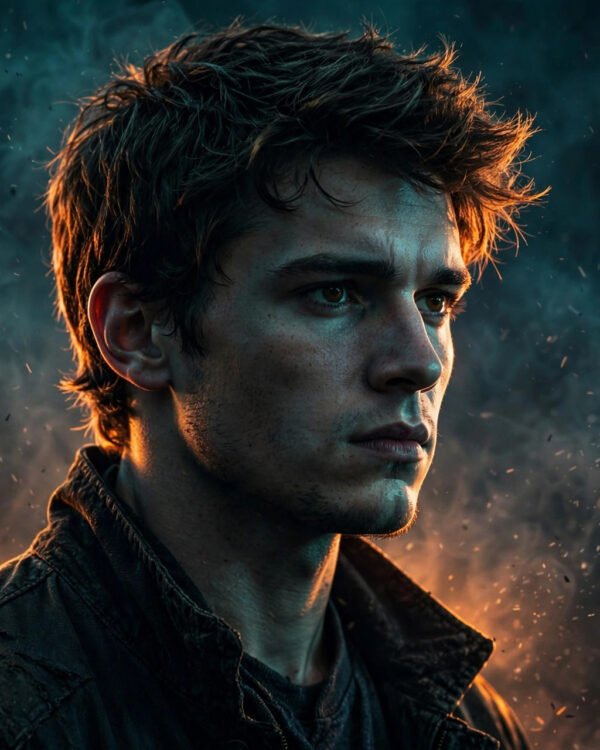
9. Angry Young Hero
Transform the uploaded photo into a 1980s Bollywood action hero poster look. Keep the face identical. Open-collar shirt, leather jacket, thick hair with side part, serious intense expression. Dramatic low-angle shot, dusty background, warm orange film grading, grainy vintage film texture.
10. Retro Bike Rider
Recreate this person as a 1980s biker. Same face and hairline. Sitting on a classic vintage motorcycle, aviator sunglasses pushed up on the head, brown leather jacket, flared jeans. Country road at sunset, lens flare, 35mm film grain, nostalgic warm colours.
11. Disco Dancer
Turn the uploaded photo into a 1980s disco dancer portrait. Keep the face exactly the same. Shiny silver jacket, bell-bottom pants, mid-dance pose with one hand pointing up, colourful light-up dance floor, mirror ball, haze and neon lights, grainy flash photo.
12. Classic Studio Portrait
Make this photo look like a 1980s studio portrait from an old family album. Same face. Wide-collar printed shirt, neat moustache only if already present, combed puffed hair, hand on chin pose. Plain grey studio background, soft key light, faded colours, slight paper texture.
13. Vintage Car Gentleman
Recreate the uploaded person leaning on a vintage 1980s Ambassador-style car. Keep the face unchanged. Safari suit, aviator sunglasses, wristwatch, confident pose. Old city road with hand-painted shop signs, warm afternoon light, 35mm film grain, realistic.
14. Cricket Fan in the 80s
Transform this photo into a 1980s cricket stadium photo. Same face. White cotton shirt, cap, holding a small radio to the ear, cheering in a crowded old stadium. Washed-out film colours, slight blur, grainy documentary-style shot.
15. Neon Arcade
Recreate the uploaded person in a 1980s video arcade. Keep the face identical. Bomber jacket, high-top sneakers, playing a retro arcade machine. Pink and cyan neon lights, glowing screens, light haze, grainy film texture, cinematic.
1980s AI Photo Prompts for Couples
Upload a photo with both of you clearly visible. Add “keep both faces exactly the same” to every couple prompt for the best result.
16. Bollywood Song Scene
Transform this couple photo into a 1980s Bollywood romantic song scene. Keep both faces exactly the same. She wears a bright chiffon saree, he wears a sweater vest and flared trousers. Standing in a field of yellow mustard flowers in the mountains, soft breeze, warm film grain, vintage colours.
17. Vintage Scooter Ride
Recreate this couple riding a vintage 1980s scooter. Keep both faces unchanged. He drives wearing aviator glasses, she sits behind with a scarf flying in the wind. Tree-lined road, golden hour, motion blur in the background, 35mm film grain, nostalgic.
18. Old Wedding Album
Turn this couple photo into a 1980s Indian wedding album photo. Keep both faces identical. Bride in a red Banarasi saree with traditional jewellery, groom in a cream sherwani with a turban. Studio backdrop with flowers, soft flash, faded colours, slight paper texture and album border.
19. Rain and Umbrella
Recreate this couple in a 1980s rain scene. Same faces. Sharing a black umbrella on an old city street, she in a white saree, he in a beige trench coat. Street lamps, reflections on wet road, cinematic soft light, warm grain.
20. Disco Couple
Transform the uploaded couple into a 1980s disco dance photo. Keep both faces exactly the same. Matching sequin outfits, mid-dance pose, mirror ball, colourful neon lights and haze, flash photography with film grain.
21. Cinema Hall Date
Recreate this couple at a 1980s single-screen cinema. Keep both faces unchanged. Standing in front of a hand-painted movie poster, holding paper cones of peanuts, retro clothes, warm tungsten lights, vintage grain and colour fade.
Retro 80s Style Prompts (Any Photo)
These short prompts work with almost any photo. Use them when you want the 80s feel without a full costume change.
Apply a 1980s film look to this photo: warm faded colours, soft halation around highlights, 35mm grain, slight light leak on the left edge. Do not change the face or clothes.
Make this photo look like it was printed in 1985: matte paper texture, slightly yellowed whites, soft focus, rounded white border, date stamp in orange in the corner.
Convert this photo into a VHS video frame from the 1980s: scan lines, colour bleeding, slight chromatic aberration, timestamp in the corner. Keep the person recognisable.
Change the background of this photo into a 1980s synthwave sunset with a pink-purple gradient sky, palm tree silhouettes and a glowing grid floor. Keep the person and lighting natural.
Restyle this photo as a hand-painted 1980s Bollywood movie poster with bold brush strokes and dramatic colours. Keep the face recognisable.
How to Make Your 80s AI Photo Look Real
- Always say “keep the face exactly the same”. Without this line, AI often changes the nose, eyes or skin tone.
- Add “film grain” and “faded colours”. Clean, sharp images look modern. The grain is what makes it feel 80s.
- Use 4:5 or 9:16. Write the ratio in the prompt so the picture fits Instagram posts or Reels without cropping.
- Keep outfits period-correct. Avoid “sneakers”, “smartwatch” or “iPhone” in prompts, because modern items break the retro look.
- Fix small mistakes with a follow-up. Reply with “make the hair more voluminous” or “reduce the grain” instead of starting again.
Turn Your 80s Photos into a Reel
Make 5 to 8 photos with different prompts, then put them in a beat-synced template so each photo appears on a beat. Our Dilbar Dilbar CapCut Template guide shows how a template does the timing for you. For more AI looks, see our cinematic AI photo editing prompts. If CapCut gives you trouble, read CapCut template not showing: 8 fixes.
Is It Safe to Upload Your Photo to AI?
Gemini and ChatGPT are mainstream tools from Google and OpenAI, but you should still be careful:
- Do not upload photos of other people without their permission, especially children.
- Avoid photos that show your house number, ID cards or school uniform badges.
- Only use the official apps or websites. Third-party “AI photo” apps sometimes ask for unnecessary permissions.
- Check the app’s settings if you do not want your chats used to improve the AI.
FAQs
What is the 1980s AI photo prompt trend?
It is a viral Instagram trend where people upload a selfie to Gemini or ChatGPT with a text prompt that turns the photo into a retro 1980s portrait, with vintage clothes, big hair, film grain and faded colours.
Which app is best for 1980s AI photo editing?
Google Gemini usually keeps the face most accurate, while ChatGPT gives a stronger film look. Both are free to try with a daily limit.
Why does the AI change my face?
The prompt did not tell it to keep your face. Add “keep the face exactly the same as the uploaded photo” and use a clear, well-lit, front-facing picture.
Can I use these prompts for couple photos?
Yes. Use the couple prompts above and upload one photo where both faces are clearly visible. Add “keep both faces exactly the same”.
Are these prompts free?
Yes. All prompts on this page are free to copy and use. You only need a free Gemini or ChatGPT account.
How do I get a vertical image for Instagram?
Write “vertical 4:5” for posts or “vertical 9:16” for Reels and Stories at the end of the prompt.